
Amazing Photo Editor7.9.2 - Download
You'll be able to download in few seconds.
Publisher Description
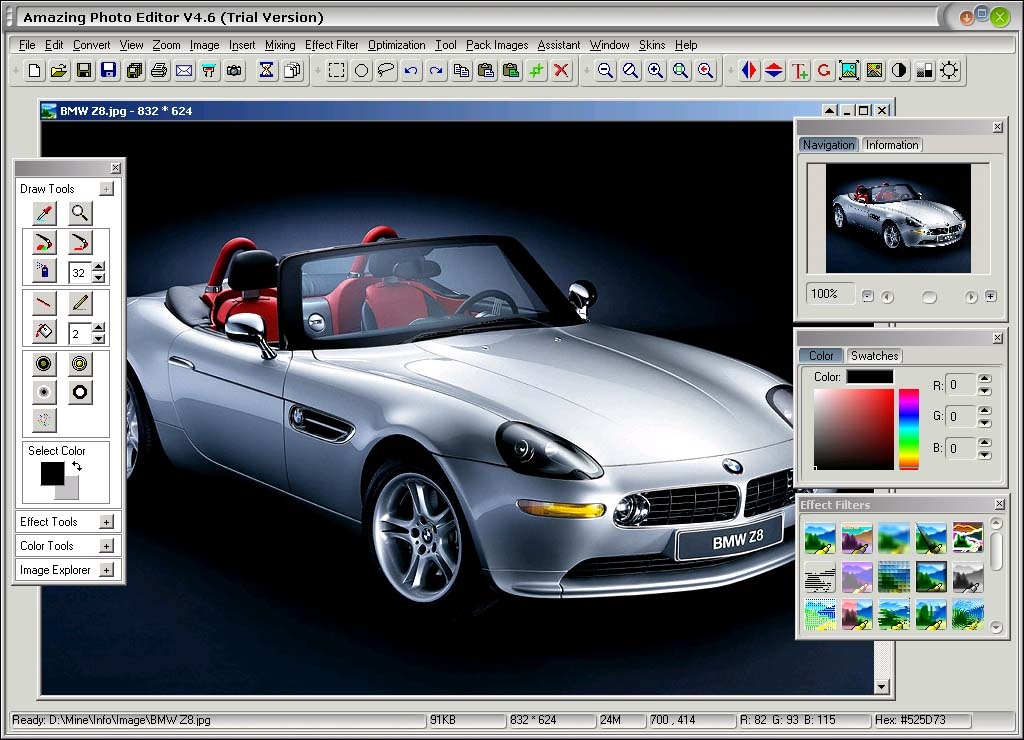
Key Features:
1. Support 53 input formats and 27 output formats.
2. photo files access. ( New, Open, Save, Save as, Save all, Print, Email photo Scanner,
Convert image format, Batch Conversion )
3. Create and use macros. ( Create, Open, Edit, Save as, Delete )
4. Multi-select tool. ( Rectangle, Circle, Toggle)
5. Cut, Copy, Paste, Memorize, Erase.
6. Zoom photos ( Zoom out, Original size, Zoom in, Best fit )
7. Magnifier with cursor.
8. Unlimited Undo / Redo.
9. 9 kinds of photo process. ( Horizontal mirror, Vertical mirror, Insert text, Rotate,
Resize, Adjust color, Negative, Gray scale, Intensity )
10. 10 photo effects (Noise, Balance, Lighten, Sharpen and so on).
11. 27 photo effect filters.
12. Color Transfer.
13. 4 photo optimization (Auto Smooth, Gussian Blur and so on).
14. Screen Color Picker.
15. Blend 2 images to 1.
16. Mixing (Orginal Image, Gradient, Lighten Gradient).
17. Insert Image / Clipboard Image in 4 mode (Copy, Mask copy, Smoothed edge, Tiles).
18. Image drawing tool (Pen, line, brush, Paint Bucket Too and so on).
21. Change folder icon.
22. Change the background color of Editing Window.
23. Capture Screen. (Full Screen, Area, Active Window)
24. Calulate color number of image.
25 Pack Images. (Pack images to a package file or unpack. )
26 Auto Save Assistant.
27 Auto Backup Assisatnt.
28 Convert GIF to EMF.
29 Image Explorer.
30. Select the program skin. ( 3 skins for trial users and 12 skins for purchase users )
31. Download more skins from our website.
32. All-around technical and sale support.
About Amazing Photo Editor
This Editors program is available in English. It was last updated on 29 September, 2026. Amazing Photo Editor is compatible with the following operating systems: Other, Windows.
The company that develops Amazing Photo Editor is Silver Eagle Software, Inc.. The latest version released by its developer is 7.9.2.
The download we have available for Amazing Photo Editor has a file size of 2.1 MB. Just click the green Download button above to start the downloading process. The program is listed on our website since 2010-11-01 and was downloaded 0 times. We have already checked if the download link is safe, however for your own protection we recommend that you scan the downloaded software with your antivirus. Your antivirus may detect the Amazing Photo Editor as malware if the download link is broken.
How to install Amazing Photo Editor on your Windows device:
- Click on the Download button on our website. This will start the download from the website of the developer.
- Once the Amazing Photo Editor is downloaded click on it to start the setup process (assuming you are on a desktop computer).
- When the installation is finished you should be able to see and run the program.
Program Details
System requirements
Download information
Pricing
Version History
version 7.9.2
posted on 2010-11-01
Fix some bugs
version 6.6
posted on 2007-05-13
Improve processing speed
Disclaimer
External Download
We do not host Amazing Photo Editor on our servers. We did not scan it for viruses, adware, spyware or other type of malware. This app is hosted by the software publisher and passed their terms and conditions to be listed there. We recommend caution when installing it.
The external download link for Amazing Photo Editor is provided to you by apps112.com without any warranties, representations or guarantees of any kind, so access it at your own risk.
If you have questions regarding this particular app contact the publisher directly. For questions about the functionalities of apps112.com contact us.
